
Imagine having a goal you can describe perfectly, but still seeing it as something that belongs to a future version of you. You know what you want—better health, financial security, a loving relationship—but every visualization still feels like you are working toward it.
Remember Your Future Studio is built around a different idea: help customers picture themselves already living the outcome. The product turns structured customer input into personalized scene prompts for AI-generated artwork, creating a visual reminder of the life they want to experience as present reality rather than a distant finish line.
Project Summary
Company: Remember Your Future Studio — my own studio/business
Responsibilities
- Product definition
- UX & form-flow design
- Prompt engineering & editing
- AI image scene creation
- Video editing
- YouTube channel creation & content
- QA design
- Implementation direction
Team
- Solo founder / product owner
- AI-assisted implementation
- Claude: coding & debugging partner
- AI image generation: part of the product
Timeline
Ongoing
Current outcomes
- Structured intake wizard live
- Test-order pipeline repaired end-to-end
- Repeatable QA matrix expanded from 9 to 15 runs
- Prompt quality still under active testing
Finished customer-facing experience
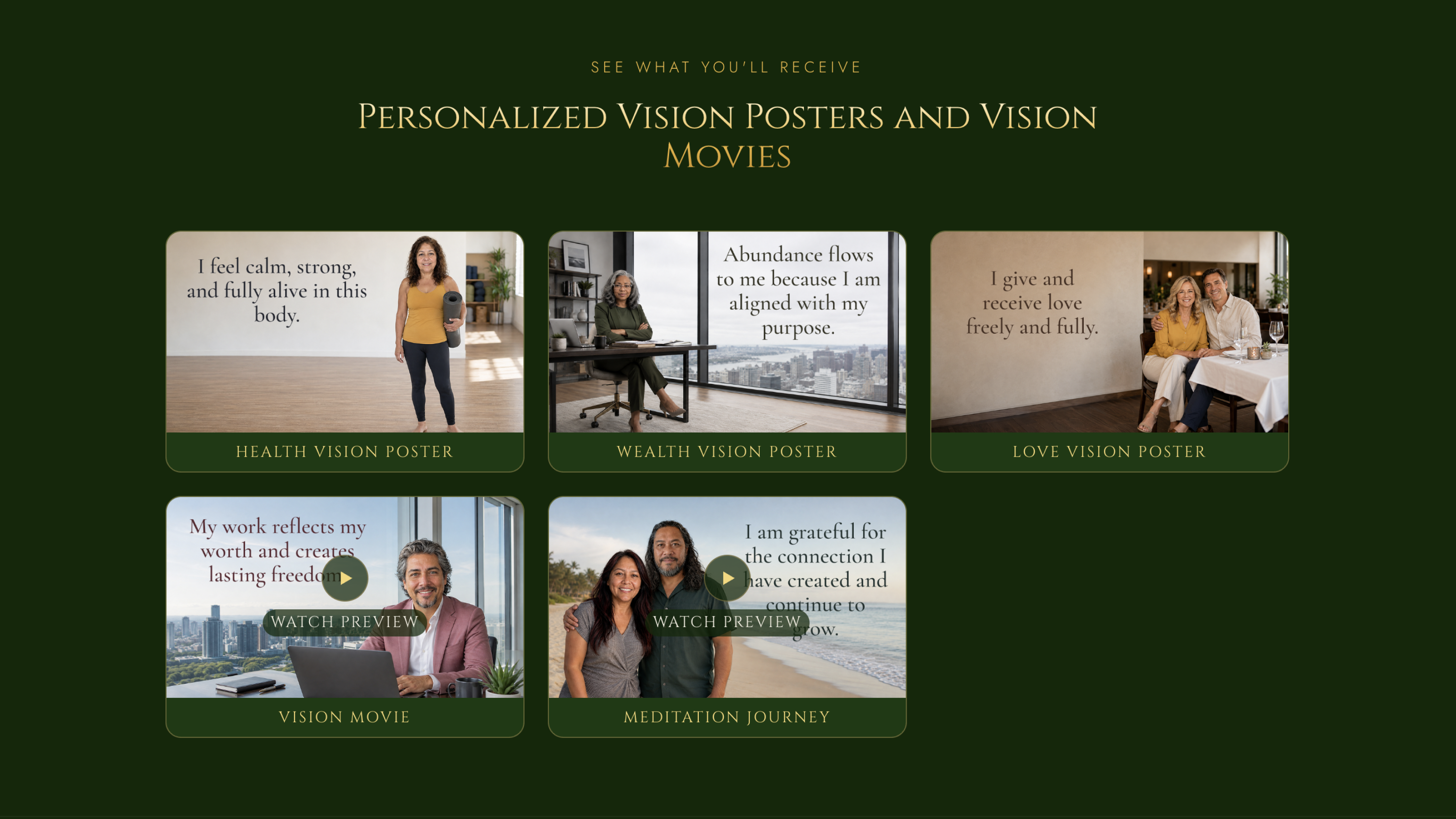
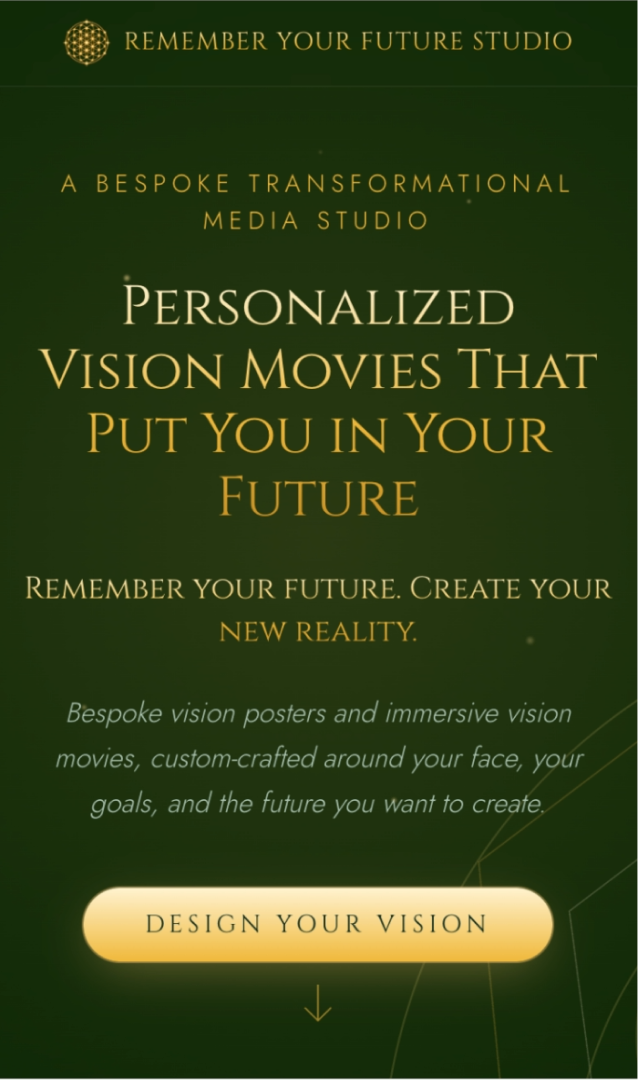
The final responsive experience introduces customers to personalized outputs through an interactive product showcase designed to work across desktop and mobile.
I Used AI as an Implementation Partner—Not as the Product Decision-Maker
I am the sole product owner, designer, and decision-maker for RYFS. I defined what the product should do, designed the customer experience, decided when an approach was not working, and determined what needed to change. I am not a developer, so Claude built most of the back-end implementation under my direction, writing and fixing code while I defined requirements, reviewed behavior and output, tested the experience, and made the product decisions. Claude was also an important debugging partner, helping trace failures and test solutions. AI is also part of the product itself: customer input ultimately becomes prompts used to generate personalized imagery.
The Product Did Not Move Through a Clean, Linear Process
RYFS developed as a loop. A UX decision changed the data shape; that broke downstream generation logic; live checkout testing exposed silent failures; fixing those failures surfaced assumptions in the data model; image testing then pushed changes back into both prompts and form fields. Instead of hiding that messiness, this case study focuses on the turning points where evidence changed my direction.
From Conversation to Structure
I originally designed customer intake as a free-form conversation with Claude. It was more novel than a conventional form, but novelty came with fragile complexity: session state, resuming sessions, and step tracking all became harder to make reliable and testable. The Claude chat also relied on API tokens for each conversation, which added an ongoing usage cost to customer intake.
I pivoted to a structured multi-step wizard. The experience became less conversational, but the tradeoff was worth it: data collection became more predictable, individual paths became easier to QA, and the product had a more stable foundation for everything downstream. Because the wizard no longer depends on a Claude conversation to collect customer answers, API-token usage is no longer a cost of the intake experience.
Conversational intake
Customers answered questions through a Claude-driven chat experience.
Multi-step wizard
Customers move through defined questions and conditional paths.
I traded novelty for reliability, testability, and a more stable foundation for fulfillment.
Guided personalization flow
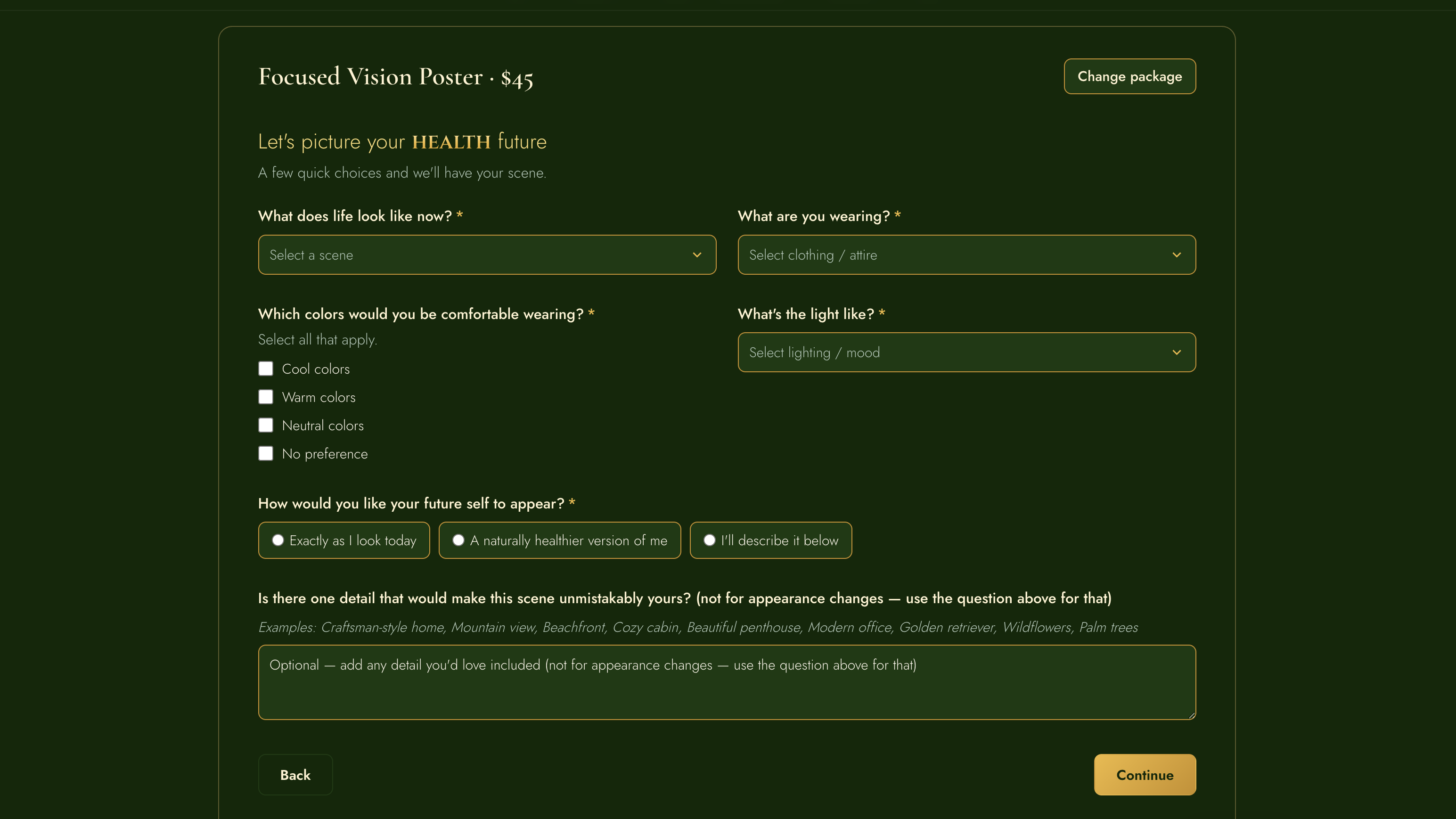
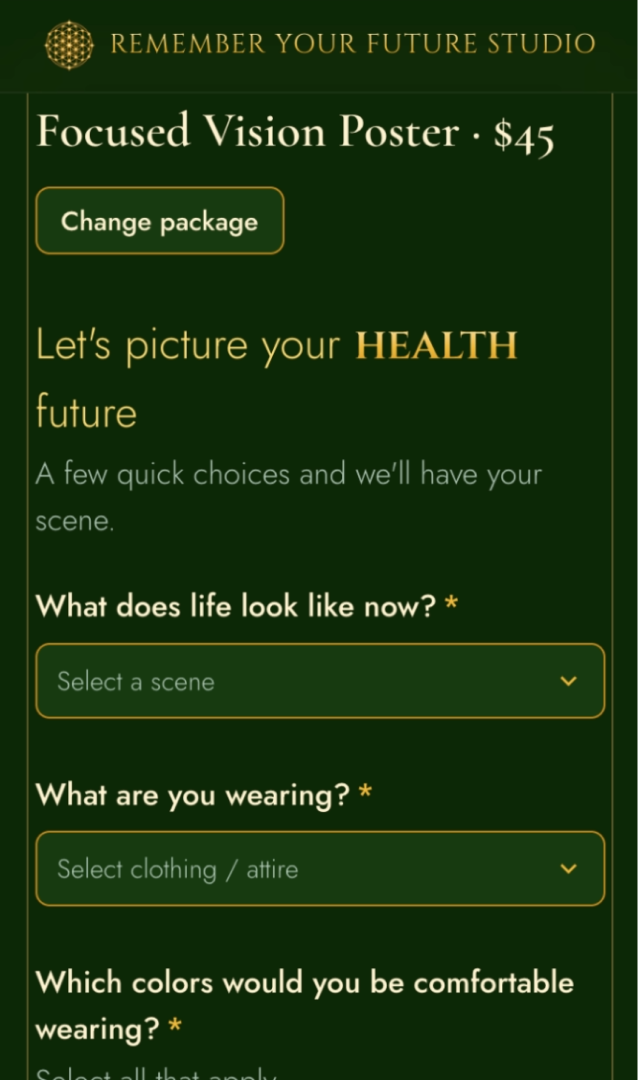
I designed the responsive purchase experience to carry customers from package selection into a guided personalization workflow across desktop and mobile.
A UX Pivot Changed the Data Shape—and Broke Everything Downstream
The wizard did not just change the interface. It changed how customer answers were organized behind the scenes. The original chat stored answers in a more layered structure with extra labels attached to each response. The wizard stored each answer more directly under its own field name. The scene-prompt code was still looking for answers in the old format, so the UX pivot quietly broke the next step in the process.
Claude updated the prompt-generation code to work with the wizard's new answer structure, including handling custom “Other” responses correctly. I directed the change and reviewed and edited the generated prompts when necessary. Restoring prompt generation reinforced a lesson that became central to the project: form design, stored customer answers, prompt logic, and generated output are one connected system.
The interface changed how answers were stored, which meant the downstream code also had to change.
Debugging a Silent Failure After a Stripe Test Payment
A full test order through Stripe's sandbox exposed a more serious problem: the test payment succeeded, but scene prompts were not generated—and the system threw no useful error. The failure was not one bug. It was a chain of four stacked issues: a status-value mismatch, stale assumptions about the intake data structure, a database category mismatch, and a leftover template placeholder.
Claude was instrumental in helping me debug this failure. Because I am not a developer, I relied on Claude to trace the back-end code with me, identify where the pipeline was breaking, and implement the fixes while I tested the full order experience and verified the outcomes. Rather than treating the first visible symptom as the whole problem, we traced the pipeline across the code and test-order data, fixed it end-to-end, and created a one-time backfill path so previously confirmed test orders could be recovered instead of abandoned.
The checkout appeared successful, but fulfillment stopped downstream. Fixing the visible symptom alone would not have repaired the full test-order flow.
Correcting My Own Data-Model Assumption
During debugging, I realized an earlier assumption about affirmations no longer matched the real fulfillment workflow. The customer's chosen affirmation had been treated as part of the AI image prompt, but in practice affirmation text is added manually after image creation.
I removed affirmation text from generated scene prompts and changed the prompts table so order, pillar, and affirmation information could be audited directly. The result was a simpler prompt that better matched production reality and a data model that was easier to inspect when something went wrong.
Catching Drift from the Product's Founding Intent
One of the most important changes was not caused by a technical bug. I noticed that two seemingly reasonable fields—“What are you doing?” and “What are you wearing?”—were subtly framing the customer as someone still performing their way toward a goal.
That contradicted the core idea behind RYFS: living in the end. The customer should imagine the achieved life itself, not assemble a scene from task-oriented details. I replaced both questions with one: “What does life look like now?”
The change made the form shorter, but that was secondary. More importantly, it brought the interaction back into alignment with the emotional intent of the product.
Two task-oriented questions
These details helped construct a scene, but they could keep the customer focused on performing or assembling the outcome.
One outcome-oriented question
The new question asks the customer to describe the achieved life directly, keeping the interaction aligned with RYFS's founding intent.
Testing Drove More Specific Partner Customization
For Love-category scenes, partner appearance needed more specificity to produce believable personalized artwork. I added facial-hair style and length fields, conditioned them on partner gender, and then kept refining the interaction through testing: adding an “Other” free-text path, adding “None,” and reordering fields to make the sequence more natural.
The important part was the pattern: ship a testable version, look at the actual output, and refine the input model when the generated result shows that the product is missing information.
Engineering QA Coverage Around Real Business Constraints
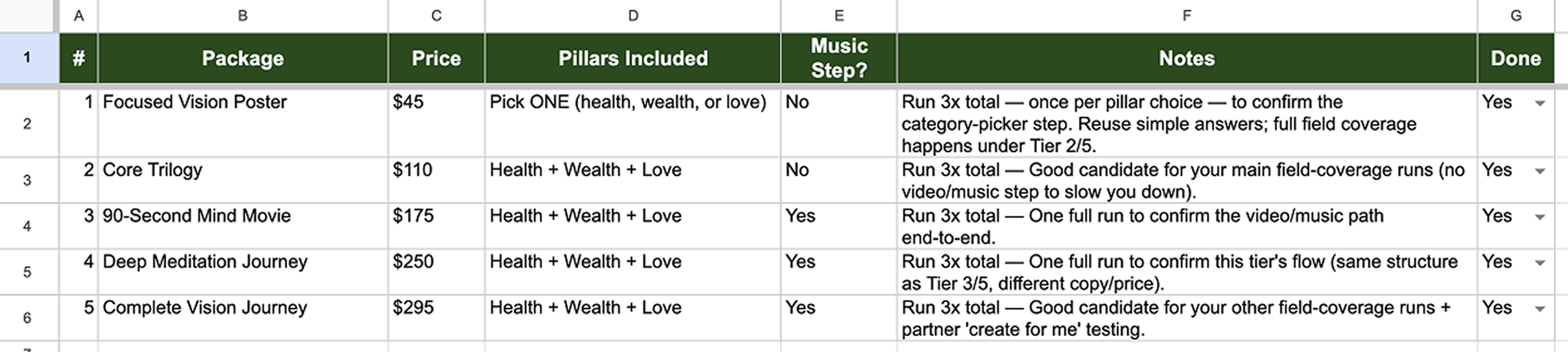
RYFS has many conditional fields and combinations, but exhaustive checkout testing is not realistic for a manually fulfilled flow using Stripe sandbox test payments. An ad hoc checklist was not enough, so I replaced it with a Master Test Runs matrix designed to cover major option combinations with a manageable number of full flows.
The matrix expanded from 9 to 15 runs as coverage gaps surfaced. This made testing repeatable without requiring hundreds of checkouts, and the resulting prompts and images could also become useful source material for the site and marketing.
15-run test matrix, covering major conditional paths
The Hard Part Now: Making AI Output Consistently Feel Like One Scene
The current work is deliberately unresolved. Repeated image testing has exposed patterns that are easy to miss in a single successful generation: incorrect subject scale, people appearing pasted into environments, inconsistent clothing colors, scenes fading into text-safe areas, and distorted hands or objects. Complexity also matters—the more people in a scene, the more opportunities AI has to introduce artifacts. I also found that angled faces produced less reliable results, so I adjusted prompts to favor more frontal views.
I am treating those failures as data. Rather than manually patching every bad image, I trace recurring problems back to the prompt logic or, when necessary, to the form fields supplying the prompt. The goal is to reduce regeneration by fixing repeatable failure modes at their source.
Observe
Compare real generations and identify patterns, not one-off mistakes.
Trace
Determine whether the root cause is prompt wording, missing input, or an image-model limitation.
Correct
Change the source and retest before accepting manual cleanup as the default.
Comparison 01

Adding people to the kitchen scene created architectural inconsistencies, like an abruptly ending wall.

Moving the scene to a restaurant reduced artifacts; minor facial variation remained acceptable for a first-round generation.
Comparison 02

Multiple people created pose issues; changing from holding hands to arm-in-arm resulted in an unnaturally long arm.

Moving the man closer corrected the arm length and created a more natural pose.
Comparison 03

Stone covered the entire wall and stopped short of the ceiling; further iterations introduced artifacts like blotchy skin.

After several iterations, I removed the fireplace entirely.
These images were made with AI.
Results So Far
RYFS is still in active product testing, so I am not forcing customer or revenue metrics before they exist. The measurable progress so far is operational: the intake moved to a more testable wizard, the test-order-to-prompt pipeline was repaired end-to-end, affected test orders gained a recovery path, and the QA plan grew from 9 to 15 engineered test runs. The larger result is a product architecture that is becoming more reliable because each iteration is tied to observed behavior rather than assumed correctness.
What This Work Demonstrates
Product judgment
Pivoting away from a novel interaction when reliability and testability mattered more.
Systems thinking
Following UX decisions through data structure, generation logic, fulfillment, and output.
Debugging rigor
Diagnosing stacked silent failures and shipping both a fix and a recovery path.
Self-correction
Revisiting assumptions when the model or workflow no longer matched reality.
Evidence-based iteration
Using generated output as feedback that can change prompts, forms, and product decisions.
Practical QA design
Building broad coverage with a manageable number of full sandbox checkout runs.
Remember Your Future Studio is an active product that I continue to design, test, and refine.